
You've spent hours — maybe days — creating a long-form video. It gets uploaded, collects a few hundred views, and then quietly fades into the algorithm abyss. Sound familiar?
Here's the thing: that video isn't done working for you. Hidden inside it are dozens of punchy, scroll-stopping moments just waiting to become YouTube Shorts. You don't need to film anything new. You just need to know how to find and shape the right moments.
In this guide, you'll learn how to make YouTube Shorts from existing videos — from understanding what makes a Short work to using AI tools that can speed up the editing process.
Why Turn Existing Videos into YouTube Shorts?
Save Time by Repurposing Existing Content
Creating content from scratch is exhausting. Script, film, edit, export, upload — rinse and repeat. Repurposing flips that equation entirely.
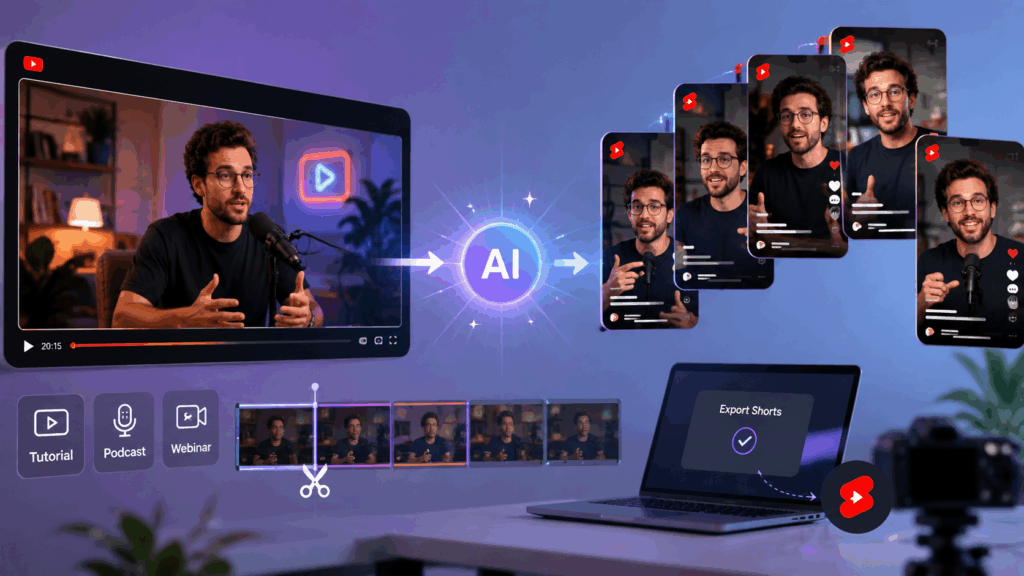
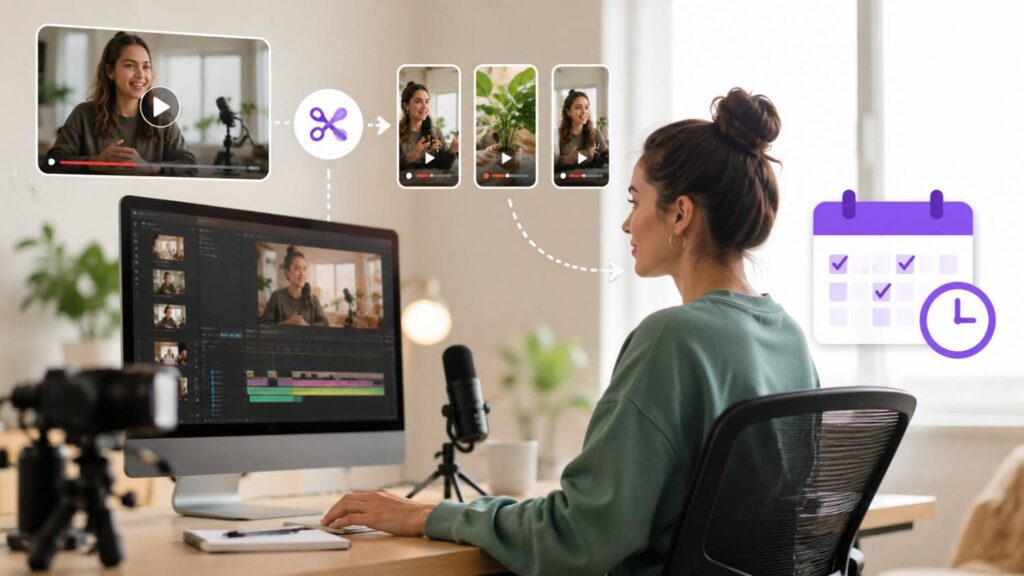
When you make YouTube Shorts from existing videos, you're not starting over. You're extracting value that's already there. A 20-minute tutorial can become several focused Shorts. A podcast episode can yield multiple compelling clips. A webinar can provide even more short-form content.
This allows creators to increase their output without adding another round of filming. One long video can become several pieces of short-form content, giving you more opportunities to reach viewers across your channel. AI video tools such as Video Cutter AI can further simplify this workflow by helping identify potential clips from longer recordings.
Reach More Viewers with Short-Form Content
YouTube Shorts has become one of YouTube's biggest discovery surfaces, with YouTube reporting more than 70 billion daily views for Shorts. That makes short-form video an important way to reach viewers beyond your existing audience.
Short-form content can reach people who may not sit through a 15-minute video. Shorts can appear in the dedicated Shorts feed and be recommended to viewers who haven't discovered your channel yet.
If you're already investing time in long-form videos, turning some of that content into Shorts gives you another way to distribute the ideas and moments you've already created.
What Makes a Great YouTube Short?
YouTube Shorts Length, Aspect Ratio, and Size Requirements
Before you start cutting, it's useful to understand the Shorts format. Eligible videos can be up to 3 minutes long and use a square or vertical aspect ratio to qualify as Shorts on YouTube.
| Specification | Requirement |
| Max Length | Up to 3 minutes |
| Aspect Ratio | Square or vertical; 9:16 is recommended for a full-screen experience |
| Resolution | 1080 × 1920px recommended for 9:16 |
| File Format | MP4 and other supported formats |
| Frame Rate | 24–60fps |
For a full-screen mobile viewing experience, 9:16 vertical is the recommended format for YouTube Shorts. YouTube also accepts square videos, as long as they meet the platform's Shorts requirements.
YouTube Shorts can be up to 3 minutes long, giving creators more flexibility to turn longer highlights, tutorials, interviews, and other moments from existing videos into short-form content.
Key Elements of High-Performing Shorts
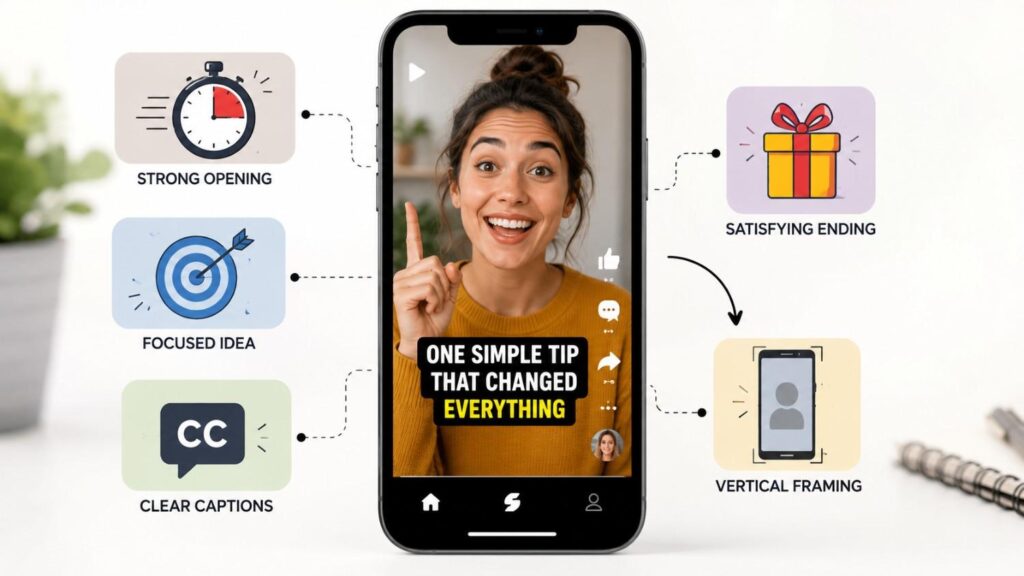
Great Shorts don't happen by accident. While there is no guaranteed formula for getting views, many effective Shorts share a few common characteristics:
- A strong opening — viewers can quickly decide whether to keep watching or swipe away
- A single, focused idea — avoid unnecessary tangents and filler
- Clear captions — captions make spoken content easier to follow, especially when viewers aren't listening with sound
- A satisfying ending — give viewers a clear takeaway or a reason to keep watching
- Good vertical framing — keep the main subject visible and easy to follow on a phone screen
Think of a Short as a highlight, not a summary. You're not simply compressing your long video — you're extracting its strongest idea or most engaging moment.
How to Make YouTube Shorts from Existing Videos with Video Cutter AI
Manually scrubbing through a 30-minute video to find the best clips can take a lot of time. That's where Video Cutter AI can help. Instead of reviewing every moment yourself, you can use AI-generated clips as a starting point for your Shorts workflow.
Here's how the process works.
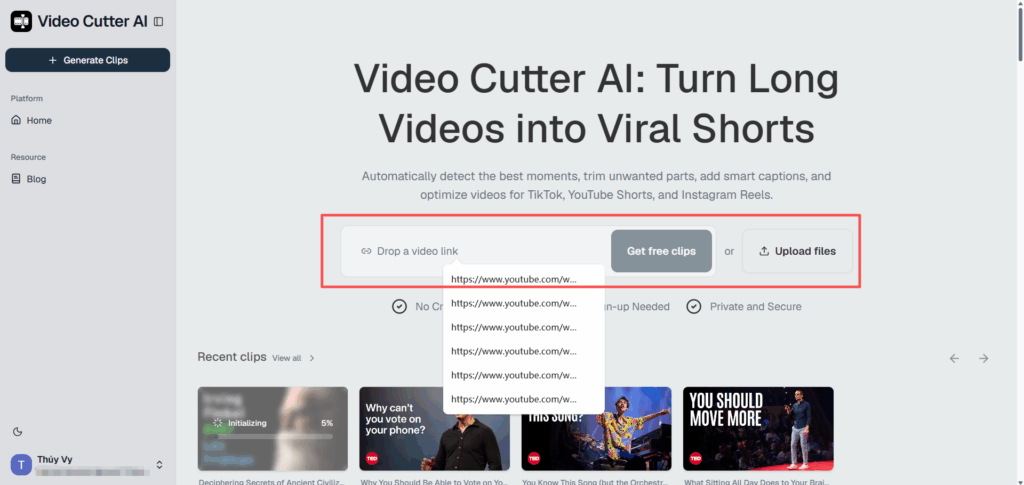
Step 1 – Upload Your Video or Paste a YouTube Link
Head to Video Cutter AI and you'll see two straightforward ways to provide your source video:
- Paste a YouTube URL directly into the input field and click Get free clips
- Upload a local video file from your device
Once the video is submitted, the tool analyzes the content to identify potentially engaging sections and generate short clips.
This is especially useful when you're working with longer recordings and don't want to manually watch the entire video just to find a few strong moments.
Step 2 – Choose Your Clip Settings and Aspect Ratio
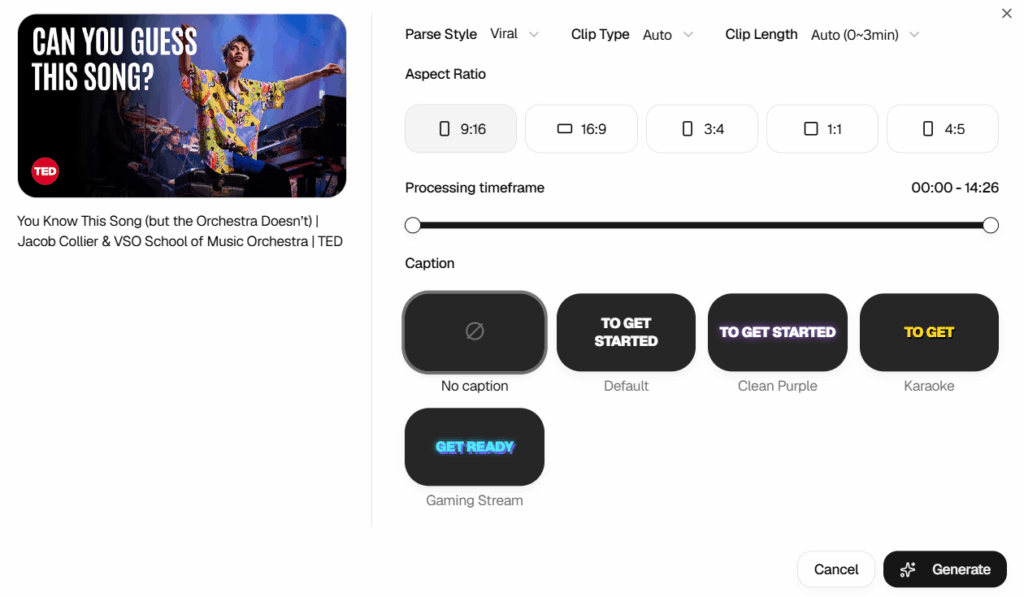
Once your video is loaded, you'll see a settings panel that gives you control over how your clips are generated. You can adjust several options based on your content and publishing goals:
- Clip Focus — Choose Viral to prioritize moments with stronger engagement potential
- Clip Model — Set to Auto to let the AI select the appropriate model
- Clip Length — Select Auto (0–3 min) or define a specific range for your clips
- Aspect Ratio — Choose 9:16 for a vertical YouTube Shorts format. Other ratios are available for different platforms
- Processing Timeframe — Use the slider to define which portion of your video should be analyzed
- Caption Style — Choose from No Caption, Default, Clean Purple, Karaoke, or Gaming Stream
These settings let you adapt the generated clips to your content style and target platform. Once you're happy with your preferences, click Generate and let the AI process your video.
Step 3 – Review AI-Generated Clips and Export Your Shorts
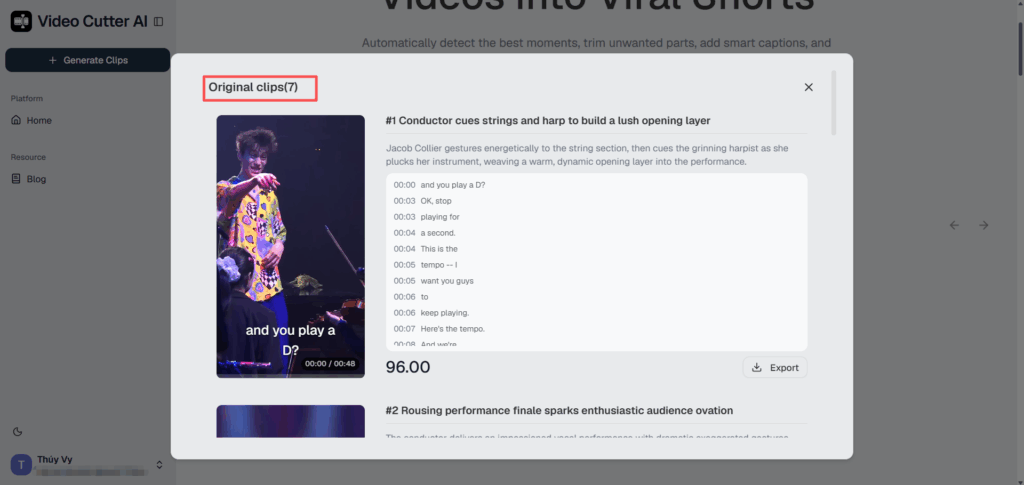
After processing, Video Cutter AI generates a selection of clips based on the content of your original video.
Each generated clip can include an auto-generated title, scene description, transcript, and virality score, giving you more information to consider when choosing which clips to use.
For example, you might see:
"#1 — TED speaker delivers a passionate, animated core argument — Score: 87.00"
You can preview the generated clips before exporting them. Select the clips that fit your content strategy and click Export to download the ones you want to turn into YouTube Shorts.
Instead of manually reviewing the entire recording first, you can start with a shortlist of potential highlights and focus your editing time on the clips that have the most promise.
Pro Tips for Making YouTube Shorts That Get Views
Start with a Strong Hook
The opening seconds matter because viewers can quickly decide whether to keep watching or swipe away. A strong opening gives viewers a clear reason to stay and discover what the Short has to offer.
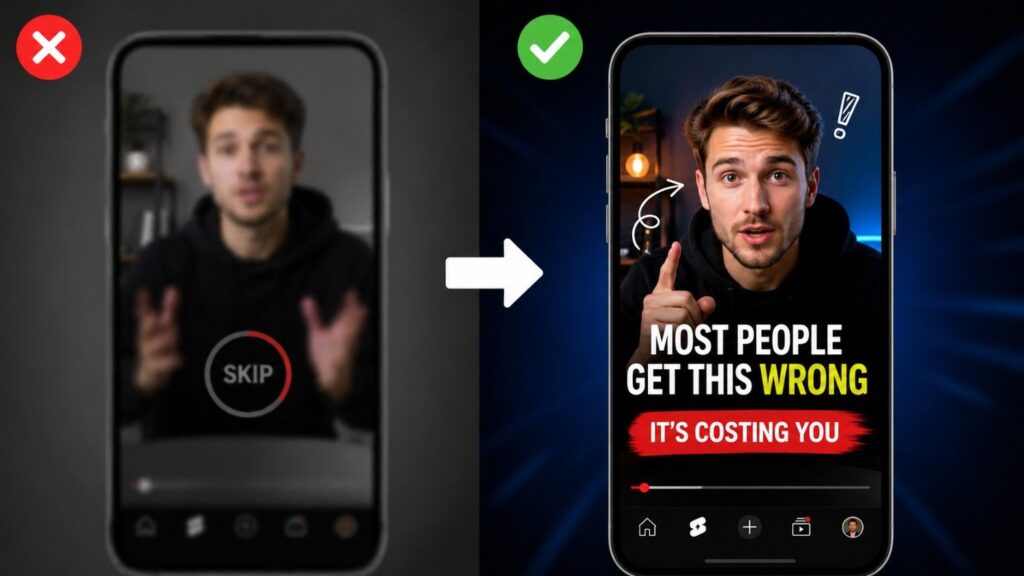
The best hooks are often specific, surprising, or curiosity-driven. Compare these two openings:
- ❌ "Hey guys, welcome back to my channel, today we're going to be talking about..."
- ✅ "Most people get this completely wrong — and it's costing them views every single day."
The second example creates an immediate reason to keep watching.
When repurposing long-form content into Shorts, look for moments where something interesting is already happening — a strong claim, a surprising idea, a useful tip, or a compelling visual. Start with that moment instead of forcing viewers through a long introduction.
Use Captions to Keep Viewers Engaged
Many viewers watch short-form content in situations where sound isn't convenient, so captions can make your message easier to follow.
Captions can also improve accessibility and help viewers understand fast-paced dialogue, technical terms, or speakers with different accents.
With Video Cutter AI, you can add captions during the clip generation process. Choose a style that matches your content, from simple and clean captions to more dynamic options, and the captions are synchronized with the generated transcript.
Write Clear Titles and Use Relevant Hashtags
Your title helps viewers understand what your Short is about before they decide whether to watch it. A good Short title should be:
- Specific — tell viewers what the video is actually about
- Curiosity-driven — create interest without misleading the viewer
- Concise — keep the main idea easy to understand at a glance
Hashtags can also help connect your Short with related content, but they shouldn't be treated as a substitute for a strong title or useful content. Use a few relevant hashtags that genuinely describe your topic rather than adding a long list of unrelated tags.
Post on a Schedule You Can Maintain
You don't need to publish Shorts every day to grow. YouTube does not require a minimum posting cadence for Shorts to perform well.
Instead, choose a publishing schedule you can maintain without sacrificing content quality. Repurposing existing videos can make that easier because one long-form recording can provide multiple opportunities for short-form content.
For example, a single podcast episode, interview, or tutorial may contain several independent moments that can work as Shorts. A consistent repurposing workflow lets you make better use of the content you've already created.
Common Mistakes to Avoid When Creating YouTube Shorts
Using the Wrong Aspect Ratio
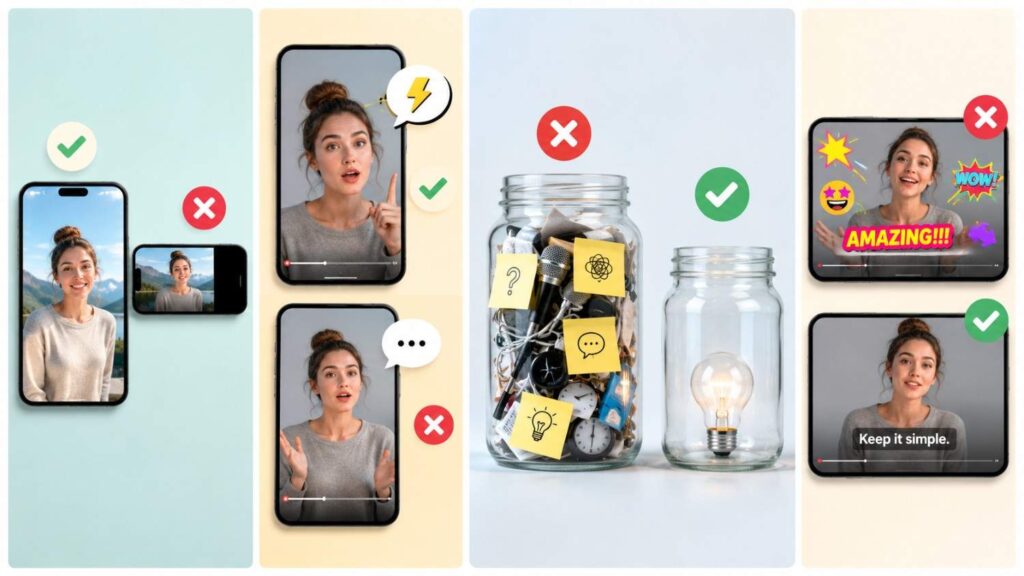
Choosing the wrong format can make your Short look awkward on mobile screens. For a full-screen viewing experience, 9:16 vertical is the standard format to use.
Before exporting, check that the main subject is properly framed and that important text or visual elements aren't cut off.
Starting with a Weak Hook
A slow build might work in a 45-minute documentary, but Shorts usually need to communicate their value quickly.
If your clip starts with background context, a long introduction, or unnecessary setup, look for a stronger starting point. Find the moment where the main idea becomes interesting and start there.
Keeping Too Much Unnecessary Content
The temptation when repurposing is to include "just a bit more" for context. Resist it.
Every part of the Short should support its main idea. If viewers need several minutes of background information before understanding the point, the clip may need more editing.
Look for sections that can stand on their own and remove pauses, repetition, and unrelated discussion where appropriate.
Overloading Your Short with Captions and Effects
Captions can improve clarity, but too many visual effects can distract from the content.
Flashing text, animated stickers, multiple font styles, and large watermarks can make a Short feel cluttered. Keep the design clean, the captions readable, and the focus on the content itself.
Frequently Asked Questions
Can I Turn Any Existing Video into a YouTube Short?
Yes, many types of existing videos can be repurposed into Shorts as long as they contain moments that can stand on their own and meet YouTube's format requirements.
Tutorials, interviews, podcasts, talks, vlogs, and product demos can all provide good source material. If the content is highly sequential, you may need to add context or edit the clip more carefully so viewers can understand it without watching the original video.
What Is the Best Aspect Ratio for YouTube Shorts?
9:16 vertical is the recommended aspect ratio for YouTube Shorts because it fills the phone screen and provides a full-screen viewing experience. YouTube also accepts square videos as Shorts when they meet the platform's requirements.
For 9:16 content, 1080 × 1920 pixels is a common recommended resolution.
How Long Should a YouTube Short Be?
YouTube Shorts can be up to 3 minutes long when they meet YouTube's Shorts requirements. For standard YouTube channels, videos with a square or vertical aspect ratio and a duration of up to 3 minutes can be categorized as Shorts.
That doesn't mean every Short should be three minutes. The right length depends on the topic and how much time you need to deliver the main idea. A useful 30-second clip can be more effective than a three-minute clip padded with unnecessary content.
Can I Make YouTube Shorts from a YouTube Video?
Yes. If the video is supported by the tool, you can paste its YouTube URL into Video Cutter AI and use the generated clips as a starting point for your Shorts.
This can be useful when you already have published YouTube videos and want to repurpose them into shorter content without manually reviewing the entire recording.
Can AI Automatically Find the Best Parts of a Video for Shorts?
Yes. AI video tools can analyze a recording and identify sections that may work well as short-form clips based on factors such as dialogue, topic changes, and potentially engaging moments.
Video Cutter AI uses AI to generate clips from your source video and provides additional information such as titles, transcripts, and virality scores. You can then review the suggestions and decide which clips are worth exporting and publishing.
Start Making YouTube Shorts from Existing Videos Today
Your existing videos can be a valuable source of new short-form content. A tutorial, podcast, interview, webinar, or YouTube video may contain multiple moments that can be turned into Shorts for a new audience.
You don't need to film everything again. Start by identifying the strongest moments in the content you've already created, then edit each one into a focused, easy-to-watch Short.
Video Cutter AI can help speed up that process. Paste a supported YouTube link or upload a video, choose your clip preferences, and let the AI generate potential highlights. You can then review the clips, select the ones you like, and export them for your Shorts workflow.
The content is already there. It's time to make more use of it.
Ready to turn your existing videos into YouTube Shorts? Try Video Cutter AI and start creating clips from the content you already have.