Free AI Podcast Clip Maker
Upload a podcast video or paste a link. AI finds highlights and adds captions. Review your clips, then export without a watermark.
or
Trusted by creators from

AI Podcast Clip Maker: Turn Podcasts into Viral Clips Free
Video Cutter AI turns long podcasts into social clips. AI Podcast Clip Maker finds highlights and adds captions for TikTok, Reels, and YouTube Shorts. Try free.

What Is AI Podcast Clip Maker?
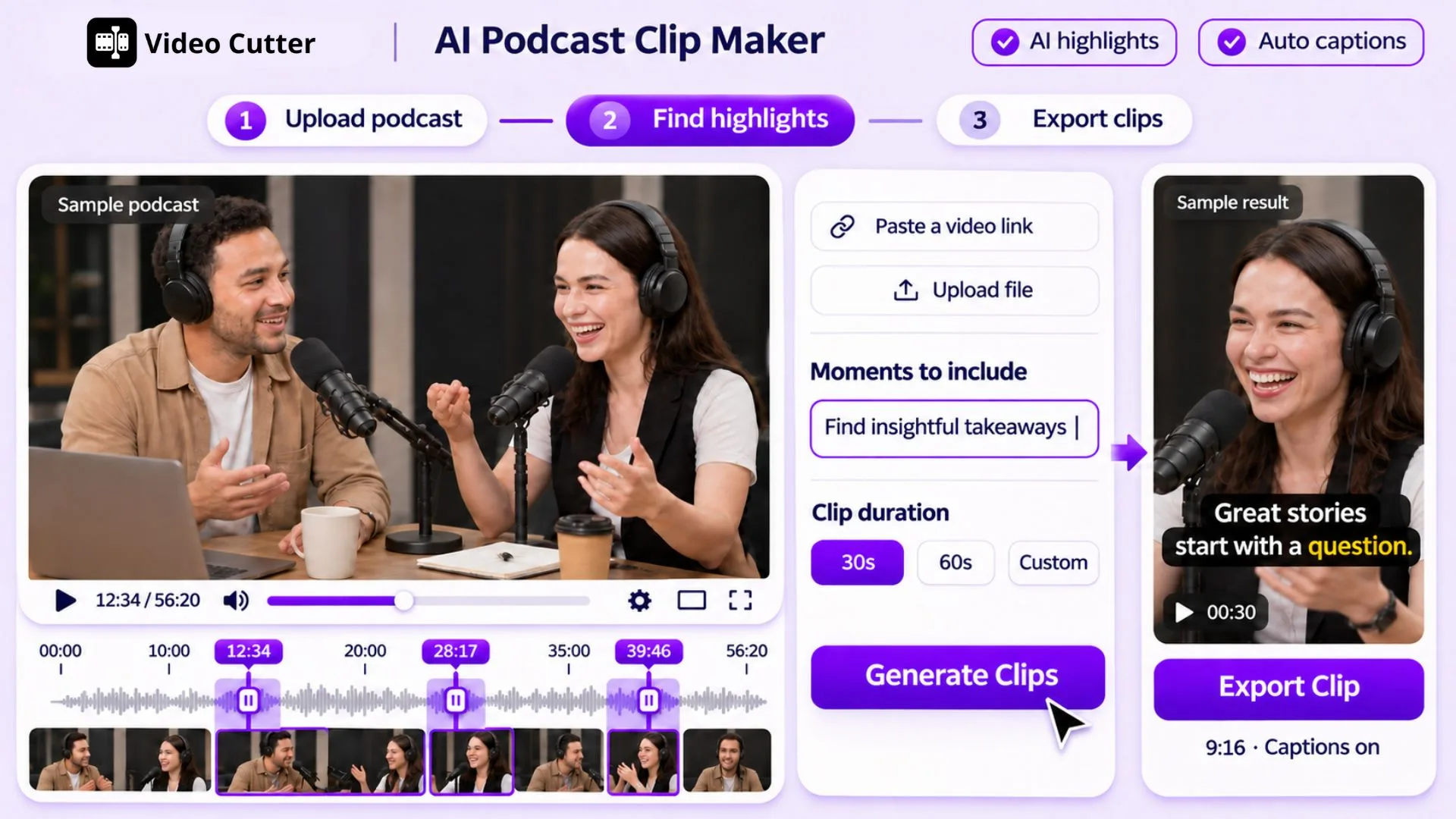
AI Podcast Clip Maker turns long podcast videos into captioned social shorts by finding standout moments and formatting clips for TikTok, Reels, and YouTube Shorts. You can also use prompts to find specific topics, guest answers, or stories. Working with a podcast already on YouTube? YouTube Clipper lets you start directly from the video link.
How to Use AI Podcast Clip Maker
1
Upload Your Podcast Video
Upload a podcast video to AI Podcast Clip Maker or paste a supported video link.

2
Choose Your Clip Settings
Select the video segment to analyze and choose a target clip length. Optionally, describe a topic in “Moments to include,” then start generating clips with AI Podcast Clip Maker.

3
Preview and Export Your Clips
Preview the generated clips, check the start and end points, and review the captions and framing. Export the clips you want to keep.


You Finished the Episode but Still Don’t Know What to Clip
A guest shares a useful answer, a surprising opinion, and a funny story—but which one deserves its own video? What felt great during the conversation may need too much setup for a short clip. AI Podcast Clip Maker gives you suggested moments to compare, so you can choose what fits your audience instead of starting from scratch.

Find Podcast Highlights Automatically
AI Podcast Clip Maker analyzes your podcast video and turns standout answers, stories, and opinions into suggested clips. Start with a selection of moments instead of searching an hour-long timeline. Spend less time finding usable footage and more time choosing what fits your audience.

Find Specific Moments with Prompts
Go beyond automatic suggestions. Tell AI Podcast Clip Maker what you want, such as “Find the guest’s pricing advice” or “Find stories about starting a business.” Topic-based prompts help you find relevant material for a specific post, rather than settling for whichever moments AI selects by default. Need to find specific moments in other types of videos? Try AI Clip Finder.

Make Every Word Easier to Follow with Captions
Names, technical terms, and fast exchanges can be hard to catch in a short podcast video. AI Podcast Clip Maker generates timed captions and lets you correct the wording before export. Choose a caption preset that suits your show, so viewers can follow the conversation even when watching without sound.
Find Your Next Podcast Clip
Try AI Podcast Clip Maker on a recorded episode. Choose a topic, review the suggestions, and export your selection for free without a watermark.
What Creators Say About AI Podcast Clip Maker
My interviews often run for more than an hour, and I used to keep a notebook beside me just to mark possible timestamps. That got old fast. AI Podcast Clip Maker from Video Cutter AI gives me a group of moments to start with, and most only need a quick check. I’m spending less time hunting through footage and more time planning my next episode.
M.R.
Independent Podcast Host
We manage four podcast accounts, so Mondays used to disappear into downloads, transcripts, and rough cuts. Using AI Podcast Clip Maker on Video Cutter AI has made that first pass much easier. I upload an episode, review the suggested moments, and send the best options to our editor. It doesn’t replace our final check, but it removes a lot of slow setup work.
J.L.
Social Media Manager
I was skeptical because some podcast clipping tools grab a dramatic sentence and leave out the point around it. AI Podcast Clip Maker on Video Cutter AI has been better at giving me complete thoughts I can actually use. I still adjust a cut here and there, which I’d expect, but I’m no longer starting from a blank timeline for every short video.
A.K.
Freelance Video Editor
Our guests share useful advice, but it’s usually buried somewhere in a 50-minute conversation. Video Cutter AI helps me uncover those answers with AI Podcast Clip Maker and turn them into shorter posts without making them feel chopped up. I can quickly decide which moments suit LinkedIn, Reels, or Shorts while staying true to the original discussion.
S.T.
Business Podcast Producer
I record weekly lessons, and each session includes several answers that deserve their own post. With AI Podcast Clip Maker from Video Cutter AI, I can turn podcast episodes into social clips without watching the whole recording again. The shorter videos let students revisit one idea and help new viewers understand what the full show is about.
D.P.
Education Content Creator
I look after content calendars for several clients, and the hardest part isn’t posting—it’s finding something worth sharing. AI Podcast Clip Maker gives me several directions from one recording, while Video Cutter AI keeps the workflow simple. I can match a practical tip to one channel, save a strong quote for another, and keep the episode active all week.
C.N.
Content Agency Strategist